Category: Gadgets & Toys

Taking the plunge and flashing

I, like many millions of others, have a Linksys WRT54G wireless router at home. Generally, it's been fine, but recently I've found myself having to reset it every few days when connectivity just seems to go away. Updating the firmware from the Linksys site didn't help.

So today I took the plunge and installed one of the free alternative firmware distributions available: DD-WRT. This is a scary process because if it fails for any reason, your router can become unusable and require quite a lot of tweaking to get it back up and running again. And you won't be able to read web pages about how to do it because you'll have lost your connectivity. (Well, I suppose you could bypass the router and plug straight into the modem, but it's still a nuisance.) There's even a new verb for this - bricking - which means turning your hardware into a brick.

Figuring that these alternative OSes wouldn't be so popular if failure was a regular occurrence, I downloaded lots of files and web pages which would help me recover in case of failure, crossed my fingers, and installed DD-WRT. And... phew!... everything went very smoothly.

I'll need to give it some time to see whether it solves my lock-up problem, but whether it does or not, I'm very impressed so far. The management pages are, if anything, rather nicer than the official Linksys ones, and there are numerous extra capabilities for those who want them. They're too numerous to list here, but key ones for me include the ability to boost the radio power, to set up static DHCP entries, to monitor the signal strength of wireless clients, and to SSH into the router from outside.

Browsing the web also seems noticeably faster to me now. I can't imagine that overall data throughput has changed - that must be limited by my cable modem speed - so I'm guessing the snappier feel comes from the built-in DNS server which caches entries by default.

Anyway - all very cool so far. We'll see how it goes...

A touching talk from TED

A few months back I linked to the multi-touch interaction work that Jeff Han and co have been doing at NYU.

Dan Clemens sent me a link to this more recent demonstration by Jeff, from the TED conference. Trust me, this is worth 10 minutes of your time!

Going underground

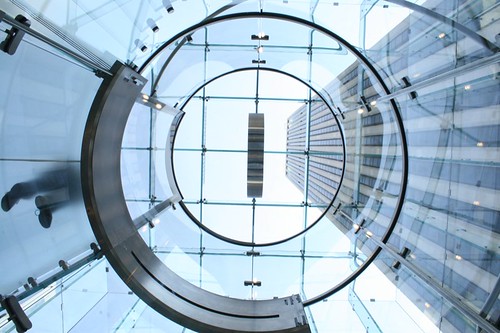
What's this?

It's the entrance to a shop. Seen from below. It's part of an nice set of photos of Apple's new retail outlet on 5th Avenue, taken by Neil Epstein.

I also went to a Mac store today, in Palo Alto, to have a look at the new MacBook.

Black MacBook

Much to my surprise, I found myself definitely drawn towards the black version, though not, I think, enough that I would pay the extra $150 Apple charges for black. I heard Tom Standage comment a couple of days ago that only Apple could charge for the colour that everyone else was using anyway!

The case has a slightly matt finish, so it's probably a different material designed not to show the scratches in the way that the black iPods did, and it may cost a bit more. Probably about $2 more.

But if the case is now matt, the screens are now glossy, in the style beloved of Sony and others. They make photos look very nice (unless you have fingerprints on your screen) but in general I'm not a fan because they reflect too much. Remember the old days of CRT screens when you had to position your computer so your back wasn't towards a window?

Otherwise, I think this is a lovely design at a reasonable price and deserves to do well. Anyone who's had to replace the hard disk inside one of Apple's other recent laptops will also really appreciate how easy it is on these in comparison.

Getting the big picture

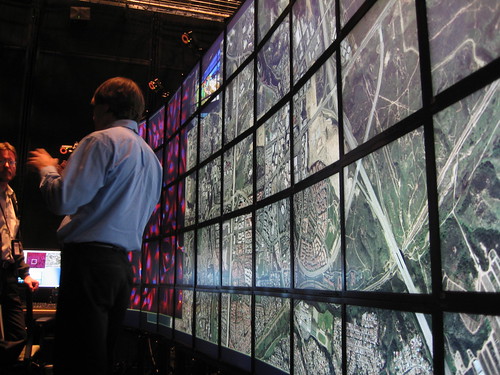
I saw my first 100 Mpixel display today, on a visit to Calit2 at UCSD.

2006_05_16-09_23_40

It's 55 standard displays, with a bank of Linux machines to drive them. So the pixels are the same size as on your normal display, but you need to walk around to examine the whole image. Very cool.

Click the picture for a couple more images.

Idea: Filofax scanner

I keep some of my notes in electronic form, and some on paper. This is a pain. I'd prefer to have everything electronic, but there are three situations where paper wins out:

  • When I'm on a phone call, at least without a headset. I need one hand to hold the phone, and writing is much more effective than typing single-handed!
  • When I'm in a meeting, if it's a small group or a one-on-one chat. I think it's most uncivilised to be typing and looking at a screen while someone's talking to you.
  • When I want to draw anything. Keyboards are good for text. Mice are awful for sketching.
Moleskine So I think I'm going to be using my Moleskine notebook for a while, but I'd love to be able to keep an archive of it on my laptop, even if only as a sequence of images. However, I really don't want to have to scan one page at a time. Anoto pen I could use an Anoto digital pen, but I'd be bound to lose the pen, and anyway it doesn't work with a Mac. It does now work with a Blackberry but only via a paid subscription service. Not for me. "Aha!", I thought recently, "I could go back to my old Filofax." It's loose-leaf and so I could take the pages out every couple of weeks and put them through the sheet feeder on my scanner. But it turns out that they're too small, and the feeder doesn't really like them. Surely there's a market here? There's no shortage of Filoxfaxes and similar 'personal organiser' systems in the world. Does anybody make a scanner that can cope with them? Or, come to that, with index cards? That would be invaluable for many academics, as well as for devotees of the Hipster PDA. If nobody else makes one, watch this space, and I'll let you know when mine goes into production.... :-)

Media Centre time

The time has come. My old and beautiful DVD player - a Pioneer DV-717 for which I paid £600 a long time ago - is starting to fade. It lost the ability to play CDs some years back, and it's now regularly having problems with the scratches on rental DVDs as well, while other drives play them just fine. It was time to replace it. I could, of course, have bought a replacement at the supermarket for half the price I once paid for a region-free mod for my Pioneer. But they don't make them like they used to - anything looks like a piece of junk when placed next to the 717. And, anyway, DVD's are so last-decade....

So yesterday I went off to the Apple store to get a Mac Mini for use as a DVD/PVR/jukebox/digibox.

I already had one of Elgato's splendid firewire TV tuners, but I needed to buy a DVI-to-S-video adapter to connect the Mini to my TV, and I also got an external DVD writer. Why bother, you may ask, when the Mini has its own superdrive? Because I have a lot of DVDs from the US as well as the UK. When I started collecting, the choice was much greater on the other side of the pond. Now, sadly, getting firmware patches to remove the region lock on DVD drives ain't as easy as it used to be. But if you have two drives, you can use one for each region. The LaCie is also a more capable drive, and the package is a reasonably cost-effective way of purchasing Roxio Toast, which integrates nicely with the Elgato software. But I do hope those nice people who came up with the region-coding system will burn in hell for all eternity, or come to some other suitably sticky end...

In general, my first impressions are good. This is a 1.66GHz Core Duo machine, and it's very speedy. Apple's Front Row software is very slick, and Equinux's MediaCentral is a good clone with some extra features for those of you who don't have Front Row. It now also works with the Apple remote control if you have one.

It's a pity that Elgato's EyeTV software isn't integrated in some way with Front Row. This is Apple's fault, not theirs, I'm sure. But at present it means that I need two remotes for the one machine.

The other thing I'm finding is that packages which, unlike Front Row and MediaCentral, aren't really intended for viewing from the other side of the room, can be quite challenging on a TV. I don't have any reason to get rid of my perfectly functional old TV at present, and it may last for several more years. Which means that for a while I'll be using a conventional GUI at a resolution just below 800x600 on a screen which was never designed to display crisp text. This won't be an issue for those with new flat panel TVs connected via DVI or VGA, but it's a bit of a challenge for me.

There are starting to be some alternative programs which interface with EyeTV, and I can always VNC in and control it from another machine, but in the meantime I'm finding the keyboard-controlled zoom feature quite useful!

Otherwise, things are looking good so far. I'll keep you informed...