Category: Open Source

Samba and the French Cafe Technique

To the London LinuxWorld today, which seemed miniscule after the San Francisco one only a few weeks ago. I was surprised at just how small it was, given the importance of Linux to the UK, and the importance of the UK to Linux, but it was still interesting.

On the train I was listening to podcasts, as I often do now while travelling. That has been the biggest impact of the iPod for me personally: the fact that I no longer consider waiting time and travelling time as wasted time, even if I'm driving or walking and couldn't easily read a book. I spend much more time on my iPod listening to speech than I do to music...

Anyway, one of the interviews I listened to was with Jeremy Allison, a key developer of Samba. For those who don't know, Samba is free software which shares files and printers over a network using Microsoft's protocols, meaning that Windows machines can communicate with Macs, Linux & Unix boxes and a variety of other devices that use Samba under the hood. It's a very important piece of software, and I've been using it for about 11 years.

Of course, Microsoft don't publish the details of their protocols. If they had their way, then Windows machines would only be able to talk to other Windows machines. So Andrew Tridgell, the creator of Samba, has to work out what they're doing through a variety of cunning techniques. He wrote a nice article about how he does it. I particularly liked his description of what he calls 'The French Cafe Technique':

Imagine you wanted to learn French, and there were no books, courses etc available to teach you. You might decide to learn by flying to France and sitting in a French Cafe and just listening to the conversations around you. You take copious notes on what the customers say to the waiter and what food arrives. That way you eventually learn the words for "bread", "coffee" etc.

We use the same technique to learn about protocol additions that Microsoft makes. We use a network sniffer to listen in on conversations between Microsoft clients and servers and over time we learn the "words" for "file size", "datestamp" as we observe what is sent for each query.

Now one problem with the "French Cafe" technique is that you can only learn words that the customers use. What if you want to learn other words? Say for example you want to learn to swear in French? You would try ordering something at the cafe, then stepping on the waiters toe or poking him in the eye when he gives you your order. As you are being kicked out you take copious notes on the words he uses.

The equivalent of "swear words" in a network protocol are "error packets". When implementing Samba we need to know how to respond to error conditions. To work this out we write a program that deliberately accesses a file that doesn't exist, or uses a buffer that is too small or accesses a file we don't own. Then we watch what error code is returned for each condition, and take notes.

Making out?

Warning - geeky post ahead... I've been doing some coding this week...

Anyone who's done any programming, at least if it's outside the limited confines of an integrated development environment, will have come across the make utility, which was developed nearly 30 years ago at Bell Labs.

Make lets you list which bits of a program depend on which other bits, so that when you make a change, say, to one of your source code files, you can just type 'make' and the bits which need to be updated as a result all get rebuilt automatically.

People use it for other things, too; many years ago I had to produce Rose's PhD thesis through a rather complicated process which started with floppies from a dedicated Panasonic wordprocessor, ran through a C program I wrote to decode the disk format, a Perl script to convert the files to LaTeX, and then Latex itself and finally dvi2ps to get the Postscript output for printing! Each stage generated different files, updated tables of contents etc, and when she fixed a typo on her Panasonic, I needed to ensure that it was propagated through the entire pipeline and made it into print. Make was good for that.

But anyone who's built a project of any size will also know that make is far from perfect. It really hasn't evolved much in its thirty years and the syntax, while elegant for very small projects, becomes unintelligible for large ones.

Here's a small segment of a Makefile I was writing last week:

define PROGRAM_template
$(1): $$($(patsubst %,%_OBJS, $(notdir $(1)))) \\
        $$($(patsubst %,%_LIBS, $(notdir $(1))))
     g++ -o  $$@ $$^ $$($(patsubst %,%_LDFLAGS, $(notdir $(1)))) $(LDFLAGS)
all:: $(1)
$(foreach obj, $($(notdir $(1)_OBJS)), \\
     $(eval $(call OBJECT_template, $(obj),$(notdir $(1)) )) )
endef

# Build every program defined in PROGS
$(foreach prog,$(PROGS),$(eval $(call PROGRAM_template, $(prog))))
Don't bother trying to understand this. The point is that it's pretty arcane stuff and I wasn't trying to do anything too sophisticated here. If you've written Makefiles before you probably know roughly what's going on, but do you know exactly what's going on? Would you have got the right number of $ signs in the right places? Could you say why $$^ is in here and not $$< ? Why I have to call things and then eval them? Then try and imagine what it's like for somebody seeing a Makefile for the first time! And here's the worst bit: for this to work at all, the gap at the beginning of the 'g++' line must be a tab, not spaces. So simple code that looks perfectly correct may not actually work when you try to run it. It's a nightmare. So last week I decided that using make in the 21st century was probably ridiculous, and it was time to search for alternatives. An IDE like Visual Studio, XCode or Eclipse will often handle dependencies for you, of course, but even if everybody in your organisation can be persuaded to use the same one, it's not a solution for cross-platform work or when you need to distribute code to others who may not have the same tools. There are a huge number of alternatives to make out there; the ant tool is popular with Java programmers, for example, but I wanted a more general solution. And after reading many articles detailing others' experiences and recommendations, I opted to experiment with scons. And I'm loving it. Scons is normally taken to be short for 'software construct', though the name didn't quite evolve from that origin. But while it may lose out to make in the elegance of the name, it's superior in almost every other way. Scons is written in Python, making it easy to install and run on most platforms, and easy to extend if you need new features. More importantly, the SConstruct files, the equivalent of Makefiles, are also valid Python, meaning that they're very readable, and yet you have the full power of a programming language there if you need it. And not a '$$($(patsubst %' in sight! I don't want to go into too much more detail here about its merits, but if you're dealing with make on a regular basis, you owe it to yourself to look at scons. Read 'What makes Scons better?' on the site's front page. See what some users have to say about it. And then print a copy of the documentation to read on the train home, and check out the wiki. That's my recommendation, anyway. It's true that the majority of the world uses make. It's also true that the majority of the world used to use COBOL.
Jarndyce and Jarndyce

To follow up on my recent posting where I mentioned the SCO/Linux fiasco, Eben Moglen, in a recent episode of the FLOSS Weekly podcast, estimated the overall costs of SCOs unsuccessful action as between $100-150M! And he's pretty well qualified to make a good estimate.

So if you're thinking of investing in a company because they've suddenly discovered they have a great IP claim, as many people appear to have done with SCO, just remember where most of that money will be going... Unfortunately, SCO wasn't the only one paying.

One of the best things about the UK legal system, I think, is that if you bring an action against somebody which is unsuccessful, you are generally liable for their legal costs as well as your own. It's one of the best barriers against an over-litigious society. May we never lose it...

What a strange world...

It's quite bizarre, I think, the whole world of anti-virus and security software. Fixing the failings in Microsoft's products has become such a huge business for the likes of Symantec and McAfee that they are complaining bitterly about Microsoft's attempt to fix the failings itself.

This is because Microsoft is getting into this business itself, and charging for software which is supposed to fix its own security holes - another slightly bizarre concept, but not, I suppose, much worse than a car dealer charging for repairs on a car he sold you, if you subscribe to the concept of 'normal wear and tear' being applied to software. It's interesting, but Windows does seem to degrade over time in a way that other software doesn't, so perhaps this model is valid! I've often wondered how many new PCs are sold because the old one is "getting very slow", and the process of wiping the hard disk and starting again from a fresh install is just too scary...

Anyway, competitors worry that they won't be able to compete with the official car dealerships because they won't have the tools, and the same is true in the software world.

I worry about what incentives Microsoft will have to make a secure system, when they directly profit from its insecurities. Especially when some of the insecurities will only be fixable by them.

It's about as far from the Linux model as you can get...

NeoOffice 2

Those splendid chaps over at NeoOffice have released the first completely free beta of version 2.0.

NeoOffice is OpenOffice with a Java-based Mac front-end; this means that you don't need to run X11 to use it, and it integrates rather better with many Mac features - most notably the native Mac fonts and printing.

NeoOffice has been around for some time, but it is now based on OpenOffice v2, which means that it's the best solution for Mac users wanting to embrace the increasingly-important OpenDocument formats.

The nice thing about standards...

...is that there are so many to choose from. Especially when it comes to Linux distributions.

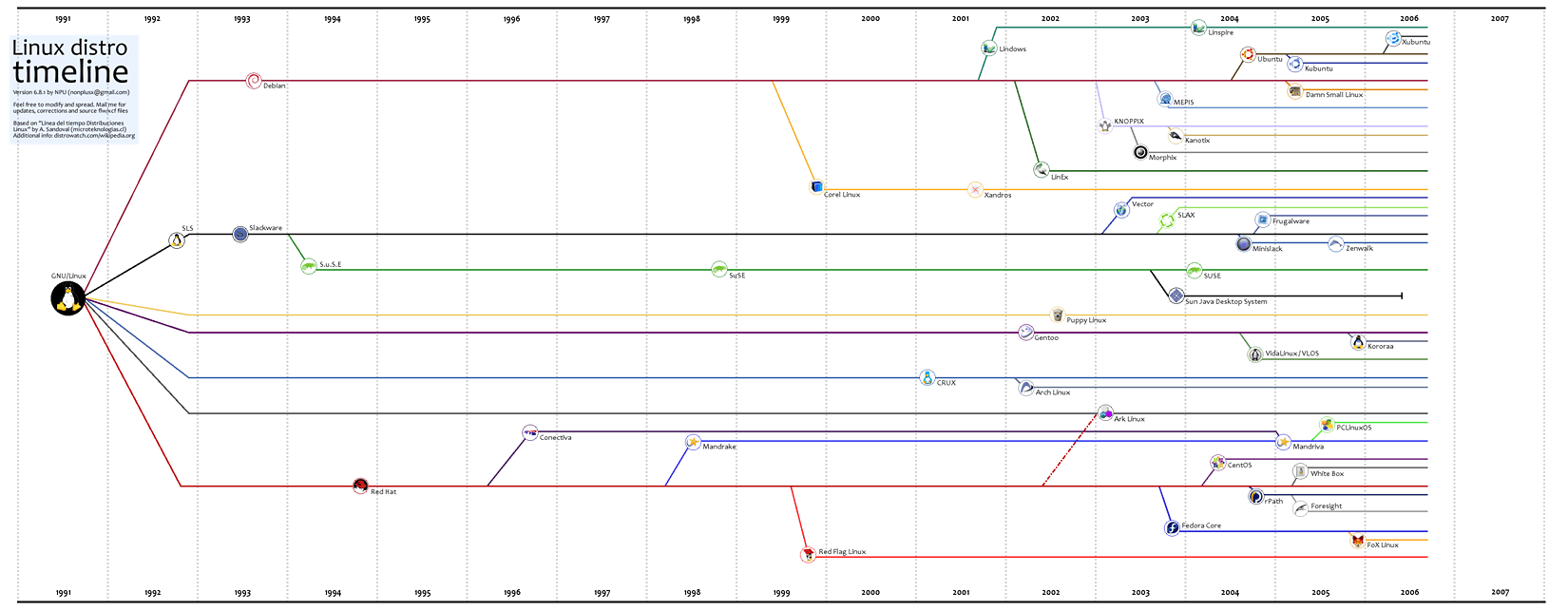
Here's a nice timeline & family tree of distributions, which makes one realise how hard the decision could be for somebody starting Linux from scratch. And this isn't complete, by any means.

My own favourite at present is Ubuntu, because it has a clean minimalism to it and I don't care whether or not my desktop looks like Windows. Novell's new SUSE Linux Enterprise Desktop is very slick and probably worth paying the $50 over the openSUSE version. Interestingly, where many distros have copied features from Windows in the past, SLED, as it's known, is now copying more from the Mac. Fedora goes from strength to strength too, and is a solid, standard option, though less exciting. You see, even I am undecided...

Here's a slightly scaled-down version of the image, for those who don't havce a shiny new 1920x1200 monitor like me, hee hee...

Linux tree This is, of course, a fork of the original image...

Network-boot a Parallels Workstation client

Warning: Geeky stuff ahead!

The Parallels Workstation virtual machine software for the Intel Macs has a BIOS which doesn't support network booting.

I wanted to simulate an LTSP workstation, which would boot over the network from our Linux server. Here's how I did it:

On the ThinStation project site, I found a link to a Universal Network Boot package - a zip file containing disk images for floppy, CD and HD.

From this I grabbed the ISO CD-ROM image eb-net.iso and set up my virtual machine to use this as the CD instead of the physical CD drive. I also configured it to boot from CD first, and, for my purposes, I removed the hard disk from the config as well.

Sure enough, it boots up just fine and I have an LTSP terminal in a window. Much easier for experimentation than rebooting my embedded device all the time.

Flashblock

Another good reason for using the Firefox web browser: the FlashBlock extension gets rid of most of those annoying Flash-based advertisements and shows a nice static placeholder icon on the page instead. If you actually want to see the Flash content, you can just click on it. One click to install.

Getting the big picture

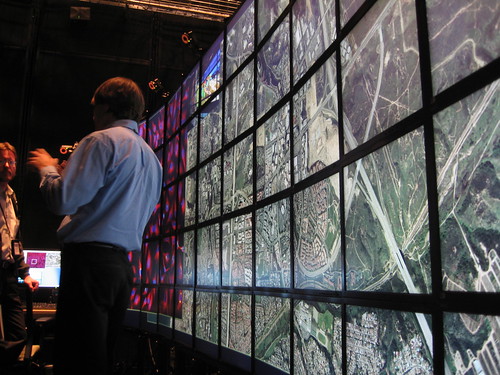
I saw my first 100 Mpixel display today, on a visit to Calit2 at UCSD.

2006_05_16-09_23_40

It's 55 standard displays, with a bank of Linux machines to drive them. So the pixels are the same size as on your normal display, but you need to walk around to examine the whole image. Very cool.

Click the picture for a couple more images.

Portable Apps

Here's an interesting site:

A portable app is a computer program that you can carry around with you on a portable device and use on any Windows computer. When your USB thumbdrive, portable hard drive, iPod or other portable device is plugged in, you have access to your software and personal data just as you would on your own PC. And when you unplug, none of your personal data is left behind.
There are portable versions of most of the current Open Source apps - Firefox, GAIM, Thunderbird, Abiword, OpenOffice...