Category: Apple

Macs and stuff

Google & CalDAV

I think this is really quite important, though it sounds pretty technical and geeky at present. Google Calendars now support the CalDAV protocol. (So, incidentally, do Calgoo).

CalDAV is an open standard for synchronising and updating calendars, and I've been keeping an eye on it ever since Apple quietly announced, way, way back, that it would be supported in the Leopard version of iCal, their desktop calendar program. This meant that you could publish your calendar to a CalDAV server, and that other people could also subscribe to it and update it.

This is important because, for many people, calendar synchronisation (allowing things like meeting room booking as well) is the only reason they run the expensive abomination that is Microsoft Exchange. To have broader support for an open standard would be great! But my hopes of a brave new world were moderated somewhat when implementations of CalDAV servers, other than the one Apple shipped with its server OS, seemed to be few and far between.

Well, it's still early days and there are limitations and some rough edges - like iCal not syncing such calendars to iPhone/iTouch - but it's a good start: with people like Google and Calgoo now creating server implementations, and iCal, Calgoo and Mozilla Sunbird (at least) supporting CalDAV on the desktop, my hope is renewed...

Thanks to Garry for the link.

iBlog

Wordpress have, as is the mode du jour, released an iPhone/iTouch app which makes it easier to blog on the move. Or on the loo. If you can read this, it works. (The app, not the loo. No, don't worry, I'm not really there!)

It's a little flaky at the moment, but the concept is quite neat, except for the fact that you have to type on the little keyboard. Too bad it won't rotate into landscape mode...

Pasting the past

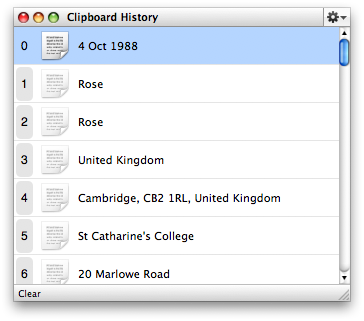
One of the most useful components of Quicksilver is the Clipboard History feature. If you have the Clipboard plugin enabled, you can bring it up with your normal Quicksilver keystroke followed by Cmd-L, and it will show all the recent entries in your clipboard. You can choose how many entries you'd like it to store.

There are various things you can do with this: double-clicking or hitting return on one of the items will insert that entry at the current point, for example. I'm filling in some US tax forms for several past years and being able to have things like our fullnames, tax references, and our full home address just a couple of keystrokes away makes the repitition a lot less painful!

For a different way of using the Clipboard History facilities, have a look at Nick Santilli's handy screencast.

Rock and Edirol

I must be just the sort of customer Apple love, I think. Having had fun playing with iMovie, I long ago upgraded to Final Cut Express, and I'm a big fan of Aperture, their offering for those who need more than iPhoto.

This week I decided to splash out on Logic Studio, which is a substantial upgrade from GarageBand, and I'm looking forward to getting to grips with it. A key part of the decision was that it includes Soundtrack Pro which is an exceedingly powerful audio editor/mixer and has good facilities for creating video soundtracks. The package isn't cheap, but some of the individual components used to cost substantially more on their own in the not-too-distant past. And hey, who knows when I might have to mix a 5.1-surround soundtrack to my home movies! One thing was clear, though, I really needed to replace my miscellaneous cheap mic pre-amps, phantom power units etc with a better audio interface if I were to make the most of Logic.

The default manufacturer of such kit for amateurs like me is usually M-Audio - I have some other bits from them, and their Fasttrack Pro USB interface was recommended on Gear Media Tech.

But USB is almost always an inferior technology to Firewire, especially if you're concerned about latencies or the number of channels. It's something PC owners often have to live with, but Macs all have Firewire, so I thought about the M-Audio Firewire 410, which you can buy from the Apple Store or, at nearly half the price, from StudioSpares. However, as I read up on this, people seemed divided on whether M-Audio are good value for money, or just cheap, and in addition, they had taken a very long time coming up with Leopard drivers for the 410.

So in the end, I went for the Edirol FA-66, also available from Studiospares. (It doesn't need any drivers for Mac OS X.)
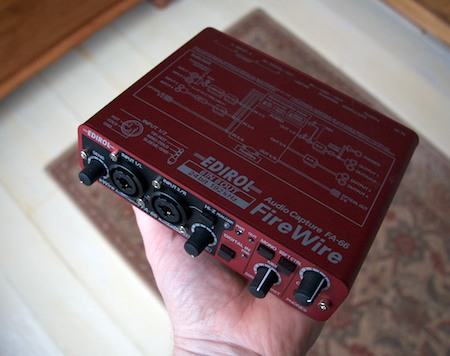
On my first quick experiments, I'm very pleased. It does everything I wanted and more. All I need now is some talent to go with it!
Happy talk?

I've always had very little luck with speech recognition systems. I don't think my voice is that strange, but I've spent too much time on the phone trying to book flights and getting "I'm sorry I didn't understand that. Please say yes or no" repeatedly as I try everything to make the blasted machine understand one simple word. Ah well.

Still, people tell me that Dragon NaturallySpeaking on Windows is getting really quite usable now, but there hasn't been an equivalent package for the Mac. Until now, apparently.

MacSpeech Dictate (formerly iListen) has been rewritten to use the Dragon recognition engine, which is generally said to be the best on the market.

It's not too cheap at $200 (though the price does include a microphone), and there's no try-before-you-buy option, but if you want or need this, it might well be worth it.

The reviews on Amazon seem to suggest that people love it or hate it - if it works, the recognition quality is exceedingly good - some say even better than the Windows product - but if you want complex features, unusual vocabularies, or customer support from the company, it sounds as if it might be worth waiting. More here.

Using the Sony eBook Reader with a Mac

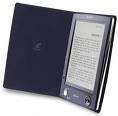
Sony eBook readerAbout a year ago I wrote about my experiments with getting a Sony PRS500 Reader talking to my Mac.

Quietly, over that time, it's been getting easier, as Kovid Goyal has turned his rather unexcitingly-named libprs500 from a basic command-line utility to a full-featured GUI application, which can do things like capture RSS feeds and format them for the Sony. It still has some quirks, but is well-worth checking out, and it runs on Windows, Mac and Linux.

Putting the 'i' back in iPlayer

iplayer logoOne of the most interesting technology developments of the last couple of weeks has, it seems to me, attracted very little attention. The BBC's iPlayer, which lets you watch most of the last week of BBC TV if you're in the UK, and a subset of it if you're elsewhere, received early criticism because it didn't work on anything but Windows.

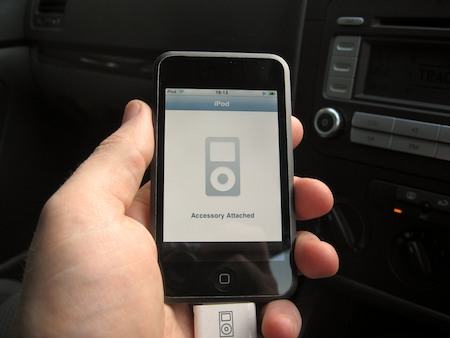
Now at least some of it works on other platforms, but the latest one is the most interesting. It now works on the iPod Touch and iPhone. I now carry around in my shirt pocket something which gives me an eminently watchable archive of the last week's TV, as long as I'm in range of a wifi network. The iPod Touch is a great video player and now, for free, there's a huge amount of stuff available in a rather high-quality format.

Only a very few years ago, the idea of having any access to an archive like this would have seemed amazing. But having it on a beautiful slab a few millimetres thick is almost sci-fi. I just wish I had the time to watch any of it! But we do live in most interesting times...