Meet Tomahawk
It's not often I'd voluntarily share an advertisement here... but this caught my eye despite my normal banner-ad blindness. I think it's very nicely done - and hard to ignore!
Quentin Stafford-Fraser's blog
One should always have something sensational to read on the net...
It's not often I'd voluntarily share an advertisement here... but this caught my eye despite my normal banner-ad blindness. I think it's very nicely done - and hard to ignore!
This morning, as I was getting ready for breakfast, I was contemplating what must, surely, be one of the finest phrases in the English language.
Not for its own intrinsic poetry, which I will grant you is minimal, nor indeed for the very pleasant experience it actually describes, but for all the additional images that it conjures up of comfort, safety, return from exciting adventures, and a sense that all is well with the world. Is there any other phrase that so encapsulates these ideals as the simple three words, hot buttered toast?
I think not.
The tactics of queueing, beautifully illustrated in a simple animated GIF:
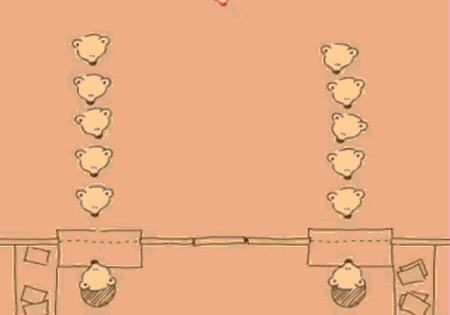
Seemed appropriate for Status-Q!
Many thanks to Martin Kleppmann for the link.OK -- here's my deep thought for the day. Or it may not be deep, but I haven't finished my first coffee yet...
Is Hume's Maxim simply a restatement of Bayesian Inference?
I'm sure this is not a new idea, but I hadn't made the connection before. Hume's Maxim, which I've always liked, basically states that:
no testimony is sufficient to establish the existence of a miracle, unless it is more likely that the miracle occurred than that the testimony was false.
(I paraphrase slightly. More info here.)
Bayes' Rule is a little more complex, so hang while I just make some more coffee... Ok. Brace yourself. This won't hurt much.
It's the following equation:
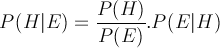
where P ( X | Y ) means 'the probability of X given Y'. It's often written using H and E for hypothesis and evidence.
It says that you can calculate the probability of a hypothesis (say, that a miracle occurred) given some piece of evidence (Mrs Jones reports having seen it).
The probability will depend on three things in the right-hand side of the equation:
If the likelihood of the laws of physics changing are greater than that Mrs Jones's report is mistaken – i.e. that P ( H ) is greater than P ( E ) – then the probability that the miracle occurred, given her testimony, is greater than one - i.e. her testimony has established the veracity of the miracle.
So the statements are saying very similar things. Interestingly, they date from about the same period, too – late 18th century – and show an unusual overlap of two magesteria – philosphy and mathematics.
For such a simple equation, Bayes' Rule is incredibly powerful, though its revelations can sometimes be hard to grasp intuitively. You benefit from it every day, though, because it turns out to be phenomenally good, for example, at working out the likelihood that a given piece of email is spam. And a deep understanding of it, combined with a good marketing team, was the foundation of Autonomy, the Cambridge company sold to Hewlett-Packard last year for $10bn.
Sadly, it isn't used often enough for assessing the reliability of conspiracy theories and Daily Mail articles, perhaps because it doesn't tend to stick in one's mind.
So for normal, day-to-day understanding of the world around you, I recommend David Hume's version.
* Update: The probability that I will get statistics correct without help is about the same as the probability that Status-Q's author is more intelligent than its readers. Thomas points out, quite rightly, that a probability can't be greater than 1 - something that had been bothering me a bit too! P(E|H) is always less than P(E), so all this is really saying is that the likelihood of a miracle having occurred given Mrs Jones's report is a bit less than the likelihood of a miracle having occurred. I may be pushing a few things too far: not least my understanding of stats. Hume is talking about the relative values of P(x), not the relationship between them. Can we draw anything more from this? A topic for discussion...!Tonight I gave a talk about the Raspberry Pi to the Cambridge and District Amateur Radio Club. I pointed out that I didn't really belong in the group, unless you stretch the word 'Amateur' almost to breaking point, for I know almost nothing about radio.
But I understand the appeal. I made little crystal sets as a child and discovered that the aluminium double-glazing frame in my bedroom was an astonishingly good aerial, provided you wanted to listen to BBC Radio 2. Any other station was likely to be disappointing, but this it received so well that I could almost just connect high-impedance headphones to the frame without any other components. I read, with great jealousy, American novels where the kids had adventures involving walkie-talkies. Many years later, the opening up of CB radio and other bands here in the UK made such things a possibility, but for me, radio was something you received, not transmitted.
On a couple of occasions, visiting a friend or distant family member, I was taken out to a 'shack' in the back garden and allowed to watch and even participate in the strange ritual of starting up shelves of valve–powered equipment, which existed to connect a little speaker and microphone, via an enormous roof-mounted antenna, to people in far-flung parts of the country or even, if atmospheric conditions were right, of the globe.
What I realise now, of course, is what these guys were doing. These were the ones who weren't the passive consumers of radio technology like the rest of us. They had gone to the trouble to amass the equipment and expertise to be allowed to transmit as well as receive. And what were they doing with it?
Late at night, decades before Mr Zuckerberg was even born, they were disappearing into their strange dens to engage in global social networking.
Since I turned on my Mac's firewall a few months ago, I get occasional messages which cause me to wonder:
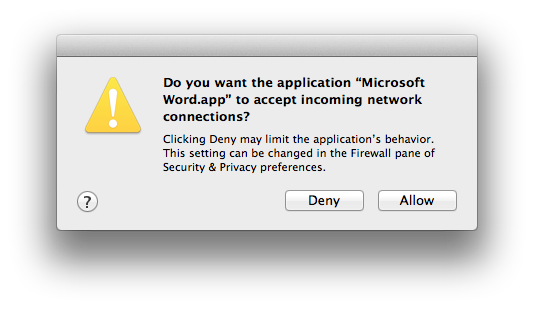
Now, I can understand why Word might want to make outgoing connections, to check for version updates, to print, etc. Anyone know why it would want to be listening on my network? It works just fine if you say no, but I am curious...
The other revealing thing, for me, was that I only saw this message today, which means I haven't used Microsoft Word for more than four months. This time, as is usually the case, I only need to run it when I'm sent something by a lawyer.
 Here's a quick and unsolicited recommendation. When I first set up Telemarq, I was looking for some accounting software that I could use on my Mac, since MYOB, of which I was rather fond, is no longer in existence.
I tried GnuCash, which is free, and now really quite good. I used Ledger for a bit, which is splendid if you're a geek who likes everything in text files. Both of these gave me a lot of control, but they also swallowed a great deal of my time.
Friends suggested I should look at cloud-based offerings, and after experimenting with a few I came across FreeAgent.
I was, I must admit, rather hesitant about this. As a limited company, albeit a very small one, we needed to pay their top rate of £25/month plus VAT. A total of £360 per year. That's quite a lot for accounting software in a small company. (If anyone decides to try it as a result of this post, please click this link and you might save me a few pennies!).
In addition, I understood 'real' double-entry bookkeeping, and this hid a lot of that behind the scenes, so it couldn't be a real accounts package, could it?
Well, several months on, I just love it. It saves me a huge amount of time - much more than 30 quid's worth per month, I suspect - does almost everything I need, and is very UK-oriented (so it tells me when my VAT returns and annual company returns are due). It produces nice invoices and send them to our clients, along with links for electronic payment options if they want to use them. It's very good at importing my bank statements with minimal manual intervention, it makes submitting VAT returns a breeze, and on the rare occasions when I've contacted support, they've been very prompt and helpful.
Finally, there's a good API, and various apps for smartphones which make it really easy to log expenses and timesheets.
There are some things I'd like changed: I wish the pricing was a bit more competitive for small companies, I wish they offered a low-cost 'personal' version because I'd like to use it on my own accounts, I'd like a few more options when configuring invoices... but all in all, it comes highly recommended.
"The thing people don't understand about weddings", said a perceptive friend once, "is that they think it's 'the bride's special day'. When in fact, of course, it's usually the bride's mother's special day. It's when she gets to create the wedding for her daughter that she wishes she'd had herself. And she'll be able to remember the details of this one."
The male equivalent is probably buying a model railway set "for the benefit of your children". Or, at least, it used to be. Now, of course, geeks of my generation are terribly keen to support the RaspberryPi, "because of all its educational benefits".
I was thinking about that this morning as I soldered transistors onto Veroboard... for the first time in about 30 years. It's for the educational benefit of my dog...
How can you take a year and a half to make a 3-minute music video? Like this:
It's even more amazing when you know how they made it. There are no green-screens here, and every frame is created by hand...
This has been out for a while, of course, but old people like me have just discovered it. (Old people like me might also be reminded of Peter Gabriel's 'Sledgehammer' video, which was pretty amazing a quarter of a century ago...)
It’s almost impossible now to start a new social network and have it taken seriously.
This is partly because of Metcalfe’s Law. In the early 80s, Bob Metcalfe proposed that the value of a communications network was proportional not to the number of devices attached to it, but to the number of possible connections that could be made between those devices – which is (approximately) the square of the number of connected devices. So, he proposed, the value of your fax machine increases every time someone else buys a fax machine. And when a network becomes ten times as big, it becomes 100 times as useful.
Now, you could have all sorts of interesting discussions about the degree to which this is really applicable to social networks, but it’s clear that there’s an enormous challenge for anyone proposing an alternative to Skype’s 30M users, Twitter’s 140M, or Facebook’s billion or so. I think it’s arguable that these three can happily coexist only because they are so different.
Facebook may be horrible, but even the mighty Google has had difficulties making a significant impact with Google Plus because, I suspect, it’s not different enough. It needs a niche of its own.
So what hope is there for App.net? This new kid on the block is still in the very early stages of growth, but there’s some reason to believe it may have found such a niche, and this has been carved out a little more clearly by the recent changes at Twitter.
Twitter, in case you missed it, have realised that the things that helped them grow big – lots of cool iPhone applications, open APIs, ease of getting your tweets in and out – are not the things that are going to help them make money, and they now need to focus on making money more than on getting big. But some of the changes come at the expense of many of their existing users.
Here’s a simple example. The network service IFTTT allows you to set up all sorts of rules - to send a tweet automatically when you post up a new blog entry, for example, or to receive a copy of your tweets by email, or archive them to Dropbox. Very handy. At least, that’s what it used to do. But with the changes to Twitter’s terms, IFTTT have had to drop the facilities that depend on taking stuff out of Twitter. You can still use it to post tweets, but you can no longer use it to archive them.
App.net, on the other hand, is gambling on the idea that there are a significant number of users who would like an open and predictable long-term relationship with their social network. Their offering is based on a few basic principles:
Of course, they point out that they do still need to make money, so joining up costs $50 a year - about the price of a Starbucks latte per month.
I signed up early, just out of curiosity, but I’ve recently started using it more seriously, and it’s because of the issue that IFTTT have so nicely clarified for me on Thursday. If you spend significant amounts of time putting stuff into anything, whether it be a blogging platform, a word processor document format, or a social network, how sure are you that you can get it out again in future?
For many of us, these data streams are not just the equivalent of phone calls that disappear on the wind as soon as you hang up. They are more like diaries, to which we may one day wish to refer again. The search box on this blog becomes a more valuable resource to me with every passing year – perhaps that’s something to do with memory loss in middle age! – but I’m struck sometimes about how many of the links I’ve posted in the past to other services no longer work, because the URLs have changed, or the services have gone away.
With App.net, assuming it is successful, I can be reasonably confident that I will be able to access and manipulate my content in the future, and extract it if I want to move it somewhere else or stop paying the $50. I can use IFTTT, for example, to cross-post anything I put there to Twitter and Facebook automatically, so my friends still know about it. Many of you may be reading this post as a result of that facility. (Apologies to those who see it more than once as a result!)
Now, a network that charges $50 is never going to be as big as one that is free. At the moment, posts on App.net are readable by everyone, so the number of readers, at least, may be affected less by this. Here are my posts so far. But only time will tell whether the combination of being in control of your own stuff, and the ‘Don’t be evil’ policy of the founders, is enough to offset Metcalfe’s law.