The Nivos are coming...
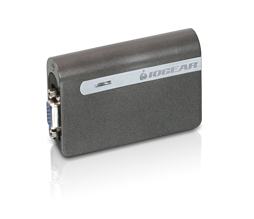 I see that IOGear's incarnation of the USB Nivo is listed on their site now, and there's a possible price of $83, though nobody seems to have stock of it quite yet...
Quentin Stafford-Fraser's blog
One should always have something sensational to read on the net...
I see that IOGear's incarnation of the USB Nivo is listed on their site now, and there's a possible price of $83, though nobody seems to have stock of it quite yet...
I have an elderly Nikon Coolpix 995, which I love. I, or at least my company, also owned two of its predecessors, and while newer cameras may have more megapixels, and be easier to wear on one's belt, the optics on these were great, and the twisty design proved useful over and over again.
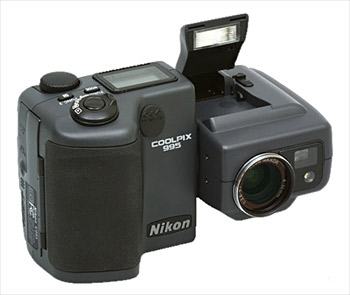
Anyway, I was distressed to see, last time I used it, that it had developed a few 'hot' pixels. These are failures in the CCD sensor, which show up as bright pixels in the same place in every image, especially when a long exposure is used.
To have a few failures is normal, and some cameras have the ability to remap such dud pixels so they don't appear in the final image. Normally, this would involve sending the camera to Nikon for servicing, but I came across a Windows utility called CCD Defects Reader, written by a Russian chap named Paul. It works with several of the cameras in the Coolpix range, and sure enough, after rebooting my Linux box into Windows to run this, my dead pixels had vanished, and a photo taken with the lens cap on was beautifully black, instead of looking like a map of the night sky!
Here's an account from somebody doing the same thing with a Coolpix 5700.Rui Carmo says his iPod Shuffle has been my faithful companion at work for many months now (it is the only way to survive the incredible waste of productivity and endless entropy brought on by the "open space office" concept).
I think I'm generally less productive when listening to music while I work - it's probably part of getting old - but it's less of a negative impact than being in an open-plan office, so I do occasionally retreat into headphones if I find myself in that environment.
Rui writes about how he uses a BluEye device to switch between his iPod and incoming phone calls. Quite neat.
But I can't help feeling that there's scope for somebody to make a killing building more officially-office-oriented products here. If you're blessed with an employer who's bought into the open plan idea, then you'll know some of the main problems:
Some questions for you:
How do you interact with a screen on a device without putting finger-marks on it? You make the frame touch-sensitive, according to a recent Apple patent.
Many people are speculating that the diagrams give a good idea of what the next iPod might look like...
Perhaps you need a Clocky...
My Nokia E61 has a keyboard and a little joystick thingy. It doesn't have a touchscreen. This can be restricting for some applications but it has a major advantage, as Steve Litchfield points out: Screens without a touchscreen in front of them are much more readable in sunlight. He has some photos to illustrate this.
Here's a picture of my Nokia E61, for those who haven't seen them in the flesh:
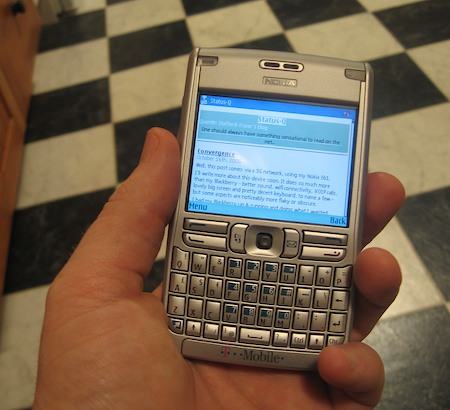
Unusually for devices of this shape, it's not a bad phone. The sound quality and signal strength are really pretty good.
I think I may have to reach for a J2ME programming book to see if I can fix some of the shortcomings of the built-in software...
Well, this post comes via a 3G network, using my Nokia E61.
I'll write more about this device soon. It does so much more than my Blackberry - better sound, wifi connectivity, VOIP calls, lovely big screen and pretty decent keyboard, to name a few - but some aspects are noticeably more flaky or obscure.
I had my Blackberry up & running and doing what I wanted very quickly, whereas I've been playing with this device all weekend and still haven't quite got it as I want it. But that's partly because there is so much more you can do with this... I didn't spend much time configuring my BB to connect to my Asterisk server via wifi, for example! But the BB is basically an enhanced phone, where this is a very capable PDA, almost a tiny laptop, with a whole new operating system to learn - Symbian, in this case, which I'm much happier to have on my phone than anything from Redmond.
The main reason I wanted to try the E61 was to get 3G connectivity for my laptop, and it does that very nicely. It's also better for doing blog posts from the breakfast table! But for general ease of use, it's hard to beat a Blackberry.
 This is very cool and I wish I'd thought of it first. It will...
...keep track of several things that need metering. That includes anything from "CPU Usage" to eBay Auction Status" to our personal favorite, "The Current GDP of Uzbekistan." From what we can tell, "The Device" connects to your Windows machine (Mac / Linux support is coming soon, apparently) and displays some piece of data generated from your computer or culled from the internet.